Showing posts with label puppylinux. Show all posts

Wednesday, June 12, 2013

Flashgot Bantu Download Manager

Punya download manager emang enak, di samping download jadi bisa lebih cepat, jadi bisa di lanjutkan lagi kalau nggak keburu. tapi dengan update browser yang terus-terusan, kadang download manager ketinggalan update sehingga pas download kok jadi nggak nyambung sama download manager ya, malah nyambungnya ke download punya browser.

Bagi pengguna Firefox, ada cara agar download kita nyambung lagi ke download manager, install addons Firefox ini. namanya Flashgot. link nya disini. ini membantu download kita di arahkan ke download manager. bahkan di linux  bisa terinteregasi dengan curl, wget dan axel.

 Silahkan download Flashgotnya, di samping membantu koneksi dengan download manager, bisa juga di pakai untuk download media yang tersimpan di web. saya pakai FDM di yang kadang ketinggalan update. jadi sangat membantu.


Monday, June 10, 2013

Ga Punya Duit Pakai Linux

Ada  di yang service notebook, rusak di keyboard, setelah di ganti dan di test ternyata hardisk pun kena. di konfirmasi ke yang punya. tunggu punya duit. dan akhirnya uang saya nyangkut di notebook orang.

Setelah beberapa minggu datang yang punya notebook.
"Mas bisa ga cari hardisk seken yang murahan"
"tanggung, ga ada garansi"
"yang penting bisa pakai internetan"
"punya Flashdisk ?"
"punya"
"OK kita instal linux saja ke Flashdisk"

Akhirnya saya Booting Linux saya di Hardisk luar, sudah jalan tancapkan fllashdisk dan saya tularkan linux yang ada di hardisk ke flashdisk. lumayan komplit, ada office dan browsernya.

Pilihan saya Puppylinux tepatnya PHAT Slacko. download link di sini.Forum di sini Pakai USB modem sudah kedetek langsung, tinggal seting dial up. kalau tidak kedetek, bisa pakai cara lama di sini
cara menularkan ke flashdisk di sini nanti di update

Sekarang uang pun cair karena linux :D

Seting multi keyboard atau arabic lihat di sini

Saturday, February 16, 2013

Add Keyboard Layout on Puppylinux

when using Puppylinux, tou will be asking for using keyboard layout when first time boot. but sometimes we need change or get more keyboard layout to work. sometime using english, other time using arabic, thai, japan or chinese.

Remember, keyboad layout is not change the langguage, its just change the way tou type on keyboad. Using keyboard layout that fit for your langgage to typing.

1. Goto menu >> setup >>Mouse/Keyboard wizard


2. Chose advance keyboard configuration

3. Just press ok when this come out

4. Click Layout

5. If you wanted to change keyboard maps, choose change and if you wanted to add new keyboard maps click Add. but next you must find out how to change keyboard maps, so it will be fast on typing.

6. Pick up you wanted to change or add. if you change keyboad layout, then it finish here(goto pic 9), but if you add keyboard then it will be next move.


7. To made key to move from keyboard maps to other maps, you must made some key to made it easy. pick option and click on group shict/ lock behaviour.

8. I am Always use shift+caps to move from keyboard one to other.
9. End. Click on Yes and Exit

Only work if you using Xorg! if using vesa will be fail.
if you using this tutorial and folow all to add keyboard layout, use ctrl+shift to change keyboard. and try to type.


Friday, February 15, 2013

Grub4Dos on Puppylinux

Here is step by step using Grub4Dos in puppylinux.

First click on menu >> system >>>grub4dos bootloader config


 Two. Select the media, in can be hardisk or removeable device such as external HD or Flashdisk. if you wanted fast and just wanna boot only on that media, tick on Seach only this drive

 Three. come out data boot for operating system, you can customize the name if you like.

 Four. Come out a dialog box, you only just to click ok to accept

Five. You already done made Grub menu. you can edit manualy here or just accept it.

Reboot and you will be get new menu.

Sunday, February 10, 2013

Grub4Dos as Key

Wanted your computer and system cant be use by any body else, this trick will made it help a bit. it will be work for linux and windows and all we need is just a puppylinux.

if you dont have it download the latest one. you can get it from puppylinux.com or puppylinux.org. or you can always my puppylinux remaster. burn it to cd.

1. run puppylinux and open gparted. remove boot flag using manage flag on right

click.
2. insert flashdisk
3. run grub4dos and set to flashdisk and dont check anything on menu


and now you will be need your flashdisk to boot. without it computer will cant start.

Wednesday, January 23, 2013

sample grub4dos menu

I think i will be need it if i have lost it in my hard drive. adn mybe other people need it too for a sample a grub4dos menu edit.

# menu.lst produced by grub4dosconfig-v1.7.2
color white/blue black/cyan white/black cyan/black
default 0

# Frugal installed Puppy

title Puppy slacko 5.3.3 (sda1/slacko)
  find --set-root --ignore-floppies --ignore-cd /slacko/initrd.gz
  kernel /slacko/vmlinuz   psubdir=slacko pmedia=atahd pfix=fsck
  initrd /slacko/initrd.gz

title Puppy slacko 5.3.3 (sda1/slacko) RAM mode\nBoot up Puppy without pupsave
  find --set-root --ignore-floppies --ignore-cd /slacko/initrd.gz
  kernel /slacko/vmlinuz   psubdir=slacko pmedia=atahd pfix=ram,fsck
  initrd /slacko/initrd.gz

# Full installed Linux

title Linux 4KS (sda1/4KS)
  uuid C05CD03B5CD02DC2
  kernel /4KS/vmlinuz root=/dev/sda1 ro
  initrd /4KS/initrd.gz

# Windows
# this entry searches Windows on the HDD and boot it up
title Windows\nBoot up Windows if installed
  errorcheck off
  find --set-root --ignore-floppies --ignore-cd  /bootmgr
  chainloader /bootmgr
  find --set-root --ignore-floppies --ignore-cd  /ntldr
  chainloader /ntldr
  find --set-root --ignore-floppies --ignore-cd   /io.sys
  chainloader /io.sys
  errorcheck on

# Boot from Partition Boot Sector

title Microsoft Windows XP Professional (sda1:PBS)
  uuid C05CD03B5CD02DC2
  chainloader +1

# additionals

title Find Grub2\nBoot up grub2 if installed
  find --set-root --ignore-floppies --ignore-cd /boot/grub/core.img
  kernel /boot/grub/core.img

title Grub4Dos commandline\n(for experts only)
  commandline

title Reboot computer
  reboot

title Halt computer
  halt
and the other one interestring is grub menu.lst from hiren's boot cd

#timeout 15
default /default
write (md)0x220+1 !BAT\necho -n -P:0000 $[0107] Hiren's BootCD 15.1 \0 && initscript (md)0x220+1

title Boot From Hard Drive (Windows Vista/7/2008 or Xp)\n
find --set-root --ignore-floppies --ignore-cd /bootmgr || find --set-root --ignore-floppies --ignore-cd /ntldr || rootnoverify (hd0) && chainloader +1 && boot
map () (hd0) && map (hd0) () && map --rehook
find --set-root --devices=h /bootmgr || find --set-root --ignore-floppies --ignore-cd /ntldr
chainloader /bootmgr || chainloader /ntldr

title \n
root

title Mini Windows Xp\nRun Antivirus and other windows programs
# example password: test
# password --md5 $1$gNe0$KZPOE8wNbTNSKOzrajuoB0
find --set-root /HBCD/XP/XP.BIN
chainloader /HBCD/XP/XP.BIN

title Dos Programs\nRun Dos Programs
find --set-root /HBCD/Dos/dos.gz
map --mem /HBCD/Dos/dos.gz (fd0)
map --hook
chainloader (fd0)+1
rootnoverify (fd0)
map --floppies=1

title Linux based rescue environment (Parted Magic 6.7)\nTo manage partitions, backup and recovery
set pm=/HBCD/Boot/pmagic.lst
find --set-root %pm%
set lang=us
set opt=
configfile %pm%

title \n
root

title Windows Memory Diagnostic\n
find --set-root /HBCD/Boot/wmemtest.gz
kernel /HBCD/Boot/memdisk
initrd /HBCD/Boot/wmemtest.gz

title MemTest86+\n
find --set-root /HBCD/Boot/memtest.gz
map --mem /HBCD/Boot/memtest.gz (fd0)
map --hook
chainloader (fd0)+1
rootnoverify (fd0)
map --floppies=1

title Offline NT/2000/XP/Vista/7 Password Changer\nWindows Password Reset 2011-05-11
find --set-root /HBCD/Boot/chntpw
set opt=vga=1
clear
echo Press ENTER to boot, or give linux kernel boot options first if needed.
echo Some that I have to use once in a while:
echo boot: nousb     - to turn off USB if not used and it causes problems
echo boot: irqpoll   - if some drivers hang with irq problem messages
echo boot: vga=ask   - if you have problems with the videomode
echo boot: nodrivers - skip automatic disk driver loading
echo
set /p opt=boot:
kernel /HBCD/Boot/chntpw %opt%
initrd /HBCD/Boot/chntpw.gz

title Kon-Boot\nWindows (any/blank password) and Linux (kon-usr) Login Without a Password
set kon=konboot.gz
find --set-root /HBCD/Boot/konboot.gz | set iscd=
find --set-root /HBCD/Boot/konbootp.gz && set kon=konbootp.gz
map --mem /HBCD/Boot/%kon% (fd0)
map --hook
chainloader (fd0)+1
if not "%iscd%"=="(cd)" pause --wait=2 HDD SWAP
if not "%iscd%"=="(cd)" map (hd1) (hd0)
map --hook
rootnoverify (fd0)
map --floppies=1

title Seagate DiscWizard (Powered by Acronis Trueimage)\nPress ALT+T+O+K to skip Error
find --set-root /HBCD/Boot/SeagatDW
kernel /HBCD/Boot/SeagatDW vga=788 ramdisk_size=32768 acpi=off quiet noapic mbrcrcs on
initrd /HBCD/Boot/SeagatDW.gz

title PLoP Boot Manager\n
find --set-root /HBCD/Boot/plpbt.bin
kernel /HBCD/Boot/plpbt.bin

title Smart Boot Manager 3.7.1\n
find --set-root /HBCD/Boot/smartbm.gz
kernel /HBCD/Boot/memdisk
initrd /HBCD/Boot/smartbm.gz

title Fix "NTLDR is Missing"\n
find --set-root /HBCD/Boot/ntldr.gz
kernel /HBCD/Boot/memdisk
initrd /HBCD/Boot/ntldr.gz

title Darik's Boot and Nuke (Hard Disk Eraser)\n
find --set-root /HBCD/Boot/dban.gz
kernel /HBCD/Boot/memdisk
initrd /HBCD/Boot/dban.gz

title Custom Menu...  (Use HBCDCustomizer to add your files)\n
find --set-root /HBCD/menu-custom.lst
configfile /HBCD/menu-custom.lst

title More...\n
root

title Dos Programs (Alternative Boot Method)\nUsing Memdisk
find --set-root /HBCD/Dos/dos.gz
kernel /HBCD/Boot/memdisk
initrd /HBCD/Dos/dos.gz


title Boot HDD 1 MBR\n
rootnoverify (hd0)
chainloader +1
title Boot HDD 1 Partition 1\n
rootnoverify (hd0,0)
chainloader +1
title Boot HDD 1 Partition 2\n
rootnoverify (hd0,1)
chainloader +1
title Boot HDD 1 Partition 3\n
rootnoverify (hd0,2)
chainloader +1
title Boot HDD 1 Partition 4\n
rootnoverify (hd0,3)
chainloader +1
title Boot HDD 2 MBR\n
rootnoverify (hd1)
chainloader +1
title Boot HDD 2 Partition 1\n
rootnoverify (hd1,0)
chainloader +1
title Boot HDD 2 Partition 2\n
rootnoverify (hd1,1)
chainloader +1
title Boot HDD 2 Partition 3\n
rootnoverify (hd1,2)
chainloader +1
title Boot HDD 2 Partition 4\n
rootnoverify (hd1,3)
chainloader +1
title Boot HDD 3 MBR\n
rootnoverify (hd2)
chainloader +1
title Boot HDD 3 Partition 1\n
rootnoverify (hd2,0)
chainloader +1
title Boot HDD 3 Partition 2\n
rootnoverify (hd2,1)
chainloader +1
title Boot HDD 3 Partition 3\n
rootnoverify (hd2,2)
chainloader +1
title Boot HDD 3 Partition 4\n
rootnoverify (hd2,3)
chainloader +1

title More...\n
root
title Boot Windows XP (NTLDR) from Hard Drive\n
find --set-root --ignore-floppies --ignore-cd /ntldr
map () (hd0)
map (hd0) ()
map --rehook
find --set-root --ignore-floppies --ignore-cd /ntldr
chainloader /ntldr
savedefault

title Boot Windows Vista/7 (BOOTMGR) from Hard Drive\n
find --set-root --ignore-floppies --ignore-cd /bootmgr
map () (hd0)
map (hd0) ()
map --rehook
find --set-root --ignore-floppies --ignore-cd /bootmgr
chainloader /bootmgr
savedefault

title Chainload isolinux.bin\n
find --set-root /HBCD/isolinux.bin
chainloader /HBCD/isolinux.bin

title Reboot
reboot

title Shutdown
halt

title Custom Menu...  (Use HBCDCustomizer to add your files)\n
find --set-root /HBCD/menu-custom.lst
configfile /HBCD/menu-custom.lst

title ...Back\n
root
you can made a custom grub menu from this example. iam often combine hiren's boot cd with puppylinux and also slax in one flashdrive.

Saturday, January 5, 2013

Using PuppyLinux for first time

I think you were already using a windows. if wanted using puppy, you might be find some puppy linux that you wanted to use. not like the other distro, puppyLinux have many Distro under it. the official and unofficial. the official have 3 main distro that always change time to time. and unofficial has a many and mybe has a thousand distro till now.

For beginer, i sugest you to start with official one to get how to use it first, but if you wanted to jump, mybe you can use my distro, its already old but mybe it willbe not hard for windows user. the link is here lets find it on http://puppylinux.com or http://puppylinux.org.

The easy way to learn is burn download the iso and burn it to CD. but if you doest have a CD burner , you always make a grub4dos in windows. and instaled or your hardisk in drive C: how to use grub4dos, will be uploded soon.

edited soon, must go out, to ears some money.

Friday, December 28, 2012

HaRoCafe

this is the first post of  harocafe and the first harocafe name come out. a cut down version of puopylinux 431 with all looking new. removed jwm and rox change using icewm and idesk.

this pupplet is for cybercafe purpose, added fast ling to firefox, twitter, meebo and teh other using prism addons on face book and made it as icon.

so if there is any question where harocafe is began. this is the first time name of harocafe come out.

here i write the link for download and the picture

Download :
http://www.silverdollarsolutions.com/PuppyLinux/pri/iso/pup-431HaRoCafeIceWM.iso thk for silver puppy
or
http://www.4shared.com/file/235054464/371873b6/pup-431HaRoCafeIceWM.html


forum link : http://murga-linux.com/puppy/viewtopic.php?t=52562

dialup using puppylinux

copyed this one from forum. look like will be many people need it.

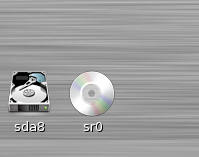
if you using windows its easy using usb modem 3g or CDMA modem its plug and isntall all modem and configuration for conected. in linux you must try something differend, you must learn how to use it and get smarter than before you cant use it. so if you wanted to be smart people, use linux and learn how to use it. ok let get start plug the modem to USB socket. if you get new cdroom device appear like this


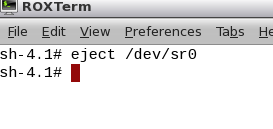
you must eject it first, or puppy will detect your modem as a cdroom than usb modem. open console and eject it,

 it can be sr0 if you dont have real cdroom or sr1 if you have cdroom and false cdroom has gone


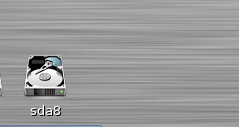
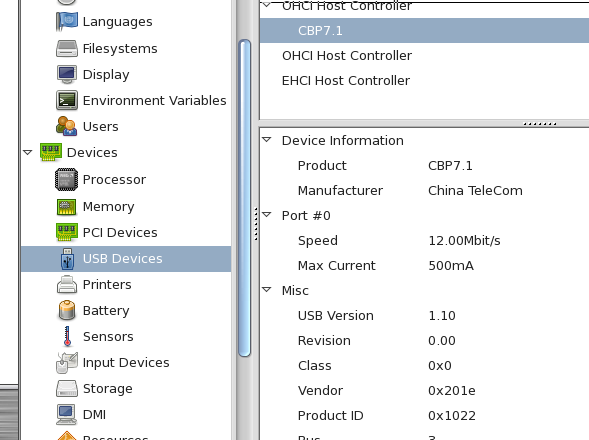
some times, i need to restart after eject, or you can continue to next step, if fail, it must be reboted first and continue after this point, but make sure there is no fake cdroom come out. goto menu >> system >> system status and config >> hardinfo hardware manager and find some usm modem cpu, mine has like this


open console again and type like this


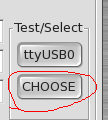
after that open menu>>internet conection wizard and choose to open internet by dialup analog or wireless modem choose modem by click on choose button


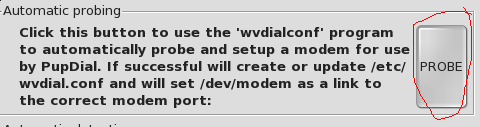
click probe button


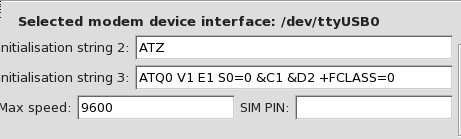
and you will get modem detected


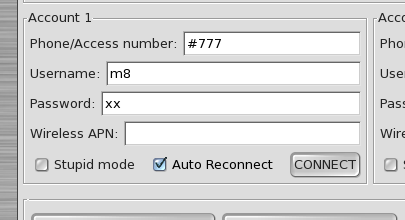
fill dialup number, user name and password. depending area or your account


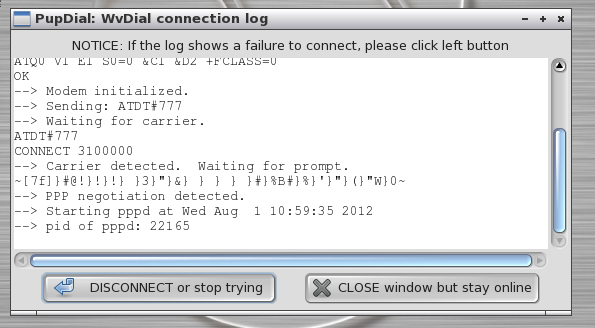
and click conect if you get like this, you already conected


enjoyy, fast internet using puppy.

Thursday, December 27, 2012

Puppylinux KDE Slax

long time no upgrade and mybe this is the best i can build from puppylinux. still use by many people around the world and my country, its because its easy to use and look like windows so new user on linux will be get use it as use a windows.

thks to silverdollarsolutions.com on hosting my iso for soo long and always there.

for you that looking for easy and good looking linux for everyday use. i sugest this one. so you can learn linux easily.

download link http://www.silverdollarsolutions.com/PuppyLinux/pri/iso/4KS-02.iso

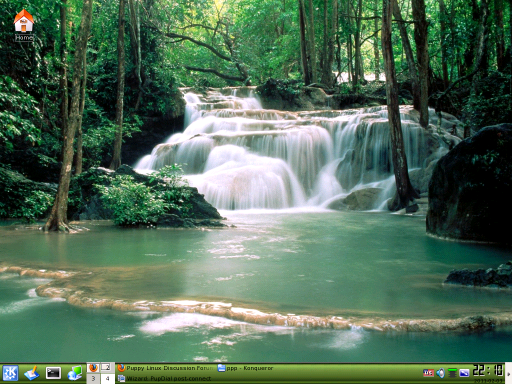
screenshoot :